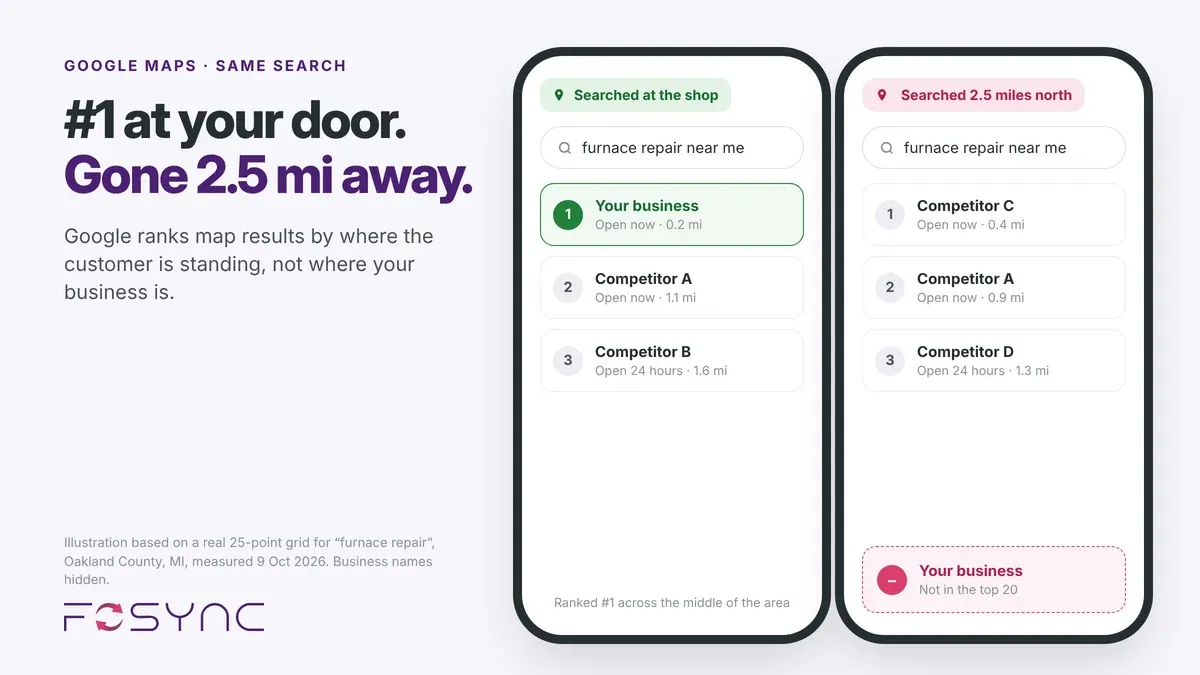
You see your business at the top of Google Maps from your office, but customers three streets away see nothing. Here is why proximity matters.
Why is my business not showing up on Google Maps? Usually because Google ranks local results partly by where the customer is standing, not only by where your business is. So you can rank first from your own office and be missing for a customer a few miles away.
Why is my business not showing up on Google Maps?
Most owners check their ranking the obvious way: they search from the office or the shop, see themselves at the top of the map, and assume customers see the same.
They don’t. Google adjusts local results to where each searcher is standing, so your own search shows the one spot where you are strongest. A customer a few miles away gets a different list, and you may not be on it.
We saw this clearly in a Competitive Findability Report we ran on 9 October 2026 for an HVAC company in Oakland County, Michigan. Searched as “furnace repair”, it ranked first close to its office, then dropped out of the results a few miles away. Your ranking isn’t one position. It’s a set of positions that changes from street to street.
How Google decides who shows up: relevance, distance and prominence
Google says local results are based mainly on three things: relevance, distance and prominence (Google Business Profile Help). Relevance is how well your profile matches what someone searched for. Distance is how far your business is from the searcher, or from the location they typed. Prominence is how well known your business is, which Google judges from reviews, links and how often it is mentioned across the web.
You can improve relevance and prominence. You can’t change your distance from a customer. That’s why a business can sit at the top when searched from its own doorstep and vanish a few miles away: closer competitors win on distance, so the further out you go, the stronger your profile, site and reviews need to be to keep showing up.
What 25 searches across one service area showed
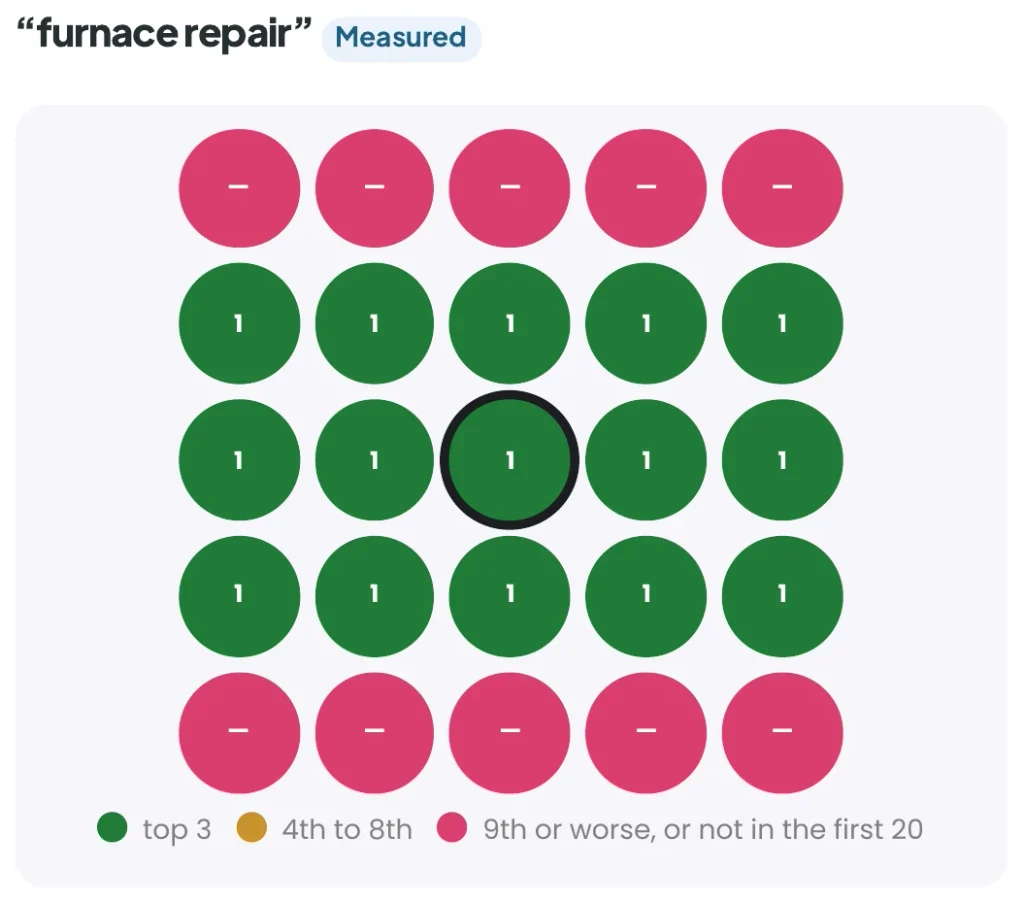
We searched “furnace repair” from 25 points across the company’s service area, each about 1.2 miles (2 km) apart. Across the middle three rows, closest to the shop, the business ranked first at every point. In the rows to the north and south, about 2.5 miles away, it did not appear in the top 20 at all. Nothing was broken. Closer competitors simply won on distance there.
Why service-area businesses feel it most
Service-area businesses such as HVAC contractors and roofers feel this most. The customer doesn’t come to them; they go to the customer, often in towns well away from the office.
If your website and Google Business Profile don’t make clear which areas you serve, and the facts about you don’t match from place to place, Google has little reason to show you over a business that is closer to the searcher. That’s when the neighboring towns go quiet.
AI assistants such as ChatGPT, Gemini and Perplexity often draw on the same map listings, reviews and website facts. A business that is hard to find on the map, or whose details differ from one place to another, can be less likely to be named when someone asks an assistant who to call.
For these businesses, “why is my business not showing up on Google Maps?” is usually a question about distance and strength, not a broken listing.
Five things that widen the area where you show up
While you cannot move your office, you can improve your digital footprint to expand your reach. Here are five practical steps to help your business show up in more places:
- Complete your Google Business Profile: Choose the most accurate primary category, add your services, and keep photos and hours current.
- Create dedicated location pages: Build a page on your website for each main service and each major town you serve. Include local details—not just copied text—to show search engines that you are a relevant choice for those specific areas.
- Maintain consistent business facts: Ensure your NAP (Name, Address, Phone) data is identical across your website, Google, and third-party directories. Contradictory information, such as conflicting operating hours, makes it difficult for machines to trust your data.
- Focus on steady reviews: Encourage customers to leave reviews that mention the town they live in and the specific job performed. This helps build local prominence and relevance.
- Build local authority: Ensure your business is listed in relevant local directories, professional associations, and supplier listings. This signals to Google that your business is an active, trusted member of the local community.
How to check where you rank across your area
The quickest way to answer “why is my business not showing up on Google Maps?” is to look at your ranking from where your customers are, not from your office. To stop guessing where you rank, you need a clear picture of your visibility.
The Competitive Findability Report provides this by measuring your rankings from 25 different points across your service area. This data helps you understand where you are winning and where you are invisible, providing a roadmap for future optimization.